

How to Pick a Headset for Your Phone, Tablet, or Computer
A headset that only works with one device tends to end up in a drawer. The better approach is to decide up front which devices you need to cover, how those devices connect, and how the headset will actually sit on your head for an hour at a time. Those three answers narrow the field faster than any spec sheet.
This guide walks through the decisions in the order they matter, so you can pick a headset for phone, tablet, and computer use without buying twice.
Start by Listing the Devices You Need to Connect
Before comparing models, write down every device you want the headset to work with. Most shoppers underestimate this step and end up with a headset that covers the laptop but not the desk phone, or the phone but not the tablet.
Single device setups
If you only need audio on one device, the choice is straightforward. A PC headset with a built-in microphone works well for remote work, video calls, and other communication from home or an office. A tablet-focused pair of headphones handles media, video, and calls on that device. When there is only one target, compatibility risk is low and you can spend your budget on comfort and sound instead of connection flexibility.
Multi device setups need a switching plan
Connecting to two or three devices raises a practical question: how do you move between them? Multi-connectivity wireless headsets are designed for exactly this. They commonly connect to a desk phone and a computer at the same time, letting you answer calls on either one.
Triple-connectivity models go further. A headset like the Poly Savi 8445 connects to a desk phone, a computer over USB, and a smartphone over Bluetooth, then switches between those sources. If your workday moves between a desk phone, a laptop, and a mobile phone, this class of headset removes the need to unplug and re-pair anything.
Connection Types: Corded, USB, and Bluetooth
Headsets are generally sold as wired, wireless, or USB models, and retailers sort office headsets by exactly those categories. Each has a different tradeoff between reliability and freedom of movement.
| Connection | Works well with | What to check before buying |
|---|---|---|
| Corded | Desk phones and computers where the headset stays in one place | That the plug matches the port on your device, and that the cable reaches comfortably |
| USB | Computers, including laptops used for video calls and remote work | Whether a USB adapter or dongle is included if your computer has limited ports |
| Bluetooth | Cell phones, tablets, and Bluetooth-enabled computers | Whether your specific device pairs reliably, not just whether it lists Bluetooth support |
Bluetooth deserves a caution. A desk phone may state that it supports Bluetooth without every Bluetooth headset working reliably with it. If a desk phone is part of your setup, confirm compatibility with the headset maker or your phone system provider rather than assuming the pairing will behave the same way it does on a smartphone.
Wearing Style Affects How Long You Can Keep It On
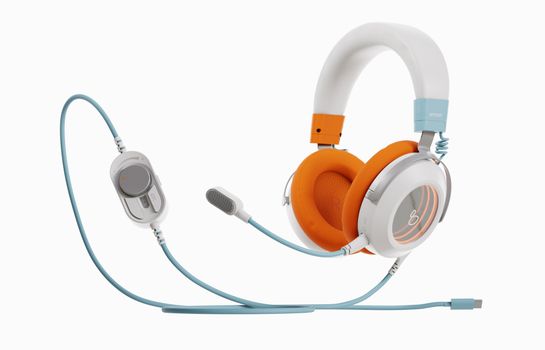
Headset listings typically describe three wearing styles: single-ear, dual-ear, and on-the-ear. The right one depends on how much of your day involves calls and how much you need to hear the room around you.
| Style | Best for | Tradeoff |
|---|---|---|
| Single-ear | Environments where you need to hear colleagues or a doorbell | Less immersive audio for music and media |
| Dual-ear | Focused calls, transcription, and blocking out nearby noise | You are cut off from room sound while wearing it |
| On-the-ear | Lighter wear during long sessions | Fit varies more between head sizes, so comfort is less predictable |
Weight and clamping pressure matter more than most buyers expect. A headset you plan to wear through a full workday should feel fine after the first hour, not just the first five minutes.
The Microphone Deserves Equal Attention
Sound quality gets discussed constantly; microphone quality gets ignored until the first call where someone says you sound far away. If the headset will be used for calls, meetings, or video conferencing, treat the microphone as a primary feature rather than an accessory.
PC headsets with built-in microphones are built specifically for remote work, video calls, and professional communication, which makes them a sensible baseline for anyone whose main device is a computer. On the phone or tablet side, check whether the microphone is part of the headset or relies on the device, since that changes how you sound on calls.
Noise Cancellation Is a Preference, Not a Requirement
Noise cancelling models exist across tablet and laptop headphones, including wireless and kids options. Active noise cancellation helps in open offices, on transit, and anywhere background sound competes with your call. It also costs more and can make it harder to hear someone speaking to you in person.
If your priority is blocking out a noisy room, look for noise cancelling models such as the Bose Noise Cancelling Headphones 700 UC, which is marketed for unified communications use. If your priority is awareness, a single-ear headset without cancellation often serves better. Decide which one you actually want before you shop, because it is one of the biggest price drivers in the category.

Match the Headset to How You Actually Use It
Remote work and video calls
A computer-first headset with a boom microphone, connected by USB or a USB dongle, covers the majority of remote work setups. Add Bluetooth if you also take calls from a mobile phone, or choose a triple-connectivity model if a desk phone is in the mix.
Desk phones in an office
Office headset ranges are commonly split between wired and wireless, with models listed for desk phones, computers, and cell phones. If your desk phone is the primary tool, start with headsets that explicitly list desk phone support, then confirm the connection method your phone system uses.
Tablets and laptops around the house
For tablet media, video, and casual calls, wireless headphones with a built-in microphone are usually the most practical. Android tablet owners can also look at brand-specific options such as Lenovo headphones designed for Android tablets, which are positioned around sound and comfort. Laptops and tablets also support kids headphones, useful if the device is shared with younger family members.
One headset for everything
If you want a single headset across phone, tablet, and computer, prioritize multi-device connectivity over every other feature. A headset that switches between a desk phone, a computer over USB, and a phone over Bluetooth covers more ground than one with better speakers but only one connection.
Compatibility Checks Before You Check Out
Compatibility is where most returns originate, and it takes about two minutes to verify. Check the connection method your phone, tablet, and computer each support. Check whether the headset needs an adapter, dongle, or base station to reach them. Check whether the manufacturer lists your device or phone system as supported. For desk phones and office phone systems, the safest route is to confirm with the headset maker or your phone system administrator before ordering, since Bluetooth support on a desk phone does not guarantee reliable headset pairing.
A Quick Pre-Purchase Checklist
- List every device the headset must work with.
- Decide between corded, USB, and Bluetooth based on how you move during the day.
- Choose a wearing style you can tolerate for hours, not minutes.
- Confirm the microphone is included and suited to calls.
- Decide whether you want noise cancellation or room awareness.
- Verify the plug, dongle, or pairing method against each device.
- Check the seller's shipping and return terms so a mismatch is easy to fix.
Buying from a store with clear shipping and return policies takes some of the risk out of the decision. Mobile Gadget HQ carries headsets and earbuds alongside phone and tablet accessories, offers free shipping and international delivery, and accepts returns within 60 days, which gives you room to test fit and compatibility at home.
Frequently Asked Questions
Is there a headset that can connect to multiple devices at once?
Yes. Multi-connectivity wireless headsets connect to a desk phone and a computer simultaneously, and triple-connectivity models add a smartphone over Bluetooth as a third source. Headsets in this category switch between connected devices rather than requiring you to unplug or re-pair each time you move from one to another.
Can you connect a headset to a tablet?
Yes. Tablets support wireless headphones, and tablets also appear alongside laptops in headphone categories covering noise cancelling and kids models. Before buying, check how your specific tablet connects, whether that is Bluetooth or a physical port, and confirm the headset supports that method.
What is a good wireless headset for both a PC and a mobile phone?
Look for a wireless headset that lists computer and cell phone support, ideally with USB connectivity for the computer and Bluetooth for the phone. Triple-connectivity headsets that also handle a desk phone cover the widest range of setups, though they usually cost more than single-connection models.
Why do some Bluetooth headsets not work with desk phones?
A desk phone can advertise Bluetooth support without every Bluetooth headset pairing reliably with it. The phone system, not the headset alone, determines how well the connection behaves. If a desk phone is central to your setup, confirm compatibility with the headset manufacturer or your phone system administrator before you buy.

