

Charging Cables Guide: USB-C, Lightning and Micro-USB in 2026
Two charging cables can look almost identical and still refuse to work with the same phone. That is the everyday frustration behind most cable confusion: the plug on the end either matches your device or it does not, and no amount of wiggling fixes a mismatched connector. This charging cables guide covers the three connector types shoppers run into most often, USB-C, Lightning and Micro-USB, along with the wider USB family they belong to, how to identify what you already own, and what to check before adding another cable to the drawer.
The cable types people mix up most
Most searches about charging cables come down to three names. USB-C is the connector used across a huge range of modern phones, tablets and laptops. Lightning is Apple's own connector, used on iPhones and other Apple devices. Micro-USB is a smaller USB variant that still turns up on plenty of gear, especially devices that have been in service for a few years. They are not interchangeable, and the only reliable way to know which one your device takes is to look at the port itself or check the documentation that came with it.
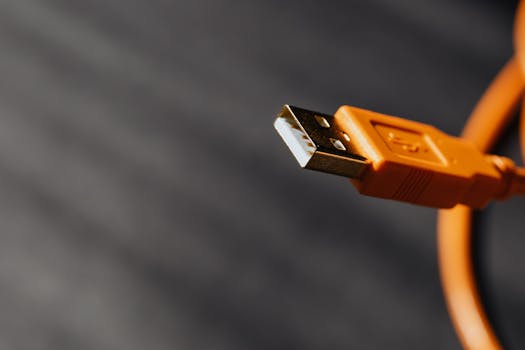
All three sit inside a bigger picture. USB was initially developed in the 1990s as a standardized method of connecting computers with keyboards, displays and other peripherals, and it has since transformed how electronic devices exchange power and data. That single standard grew into a family of connector shapes, which is why guides to USB types typically break down USB-A, USB-B and USB-C separately and explain what each one is used for. Micro-USB belongs to that same family tree.
Micro-USB, explained plainly
Micro-USB is one of the smaller connector types in the USB family, and it is the one most likely to cause a mix-up at home because the plugs look similar to other small connectors until you hold them side by side. Devices that shipped several years ago are the ones most likely to use it, but age is not a perfect rule. A device bought last month could still use Micro-USB, and a device bought years ago could already use USB-C.
The practical takeaway is simple. Do not assume a cable fits based on the age of the device or the brand printed on the box. Turn the device over, look at the charging port, and compare its shape and width to the cable end you are holding. If the plug does not seat fully and without force, it is the wrong connector, and forcing it can damage the port.
USB-C and the rest of the USB family
USB-C is the connector most new accessories are built around, but "USB-C" describes the shape of the plug rather than everything the cable can do. Published explainers on USB types, including Anker's February 2026 breakdown of USB-A, USB-B and USB-C, exist precisely because the name on the connector does not tell you the full story of a cable's capabilities. Two cables with identical USB-C ends can be built for different jobs.
That is why USB-C shopping is less about the plug and more about the specification sheet. When you buy, read what the listing actually claims the cable is for, and if a detail is not stated, treat it as unknown rather than assumed. If you need a specific capability, confirm it with the seller or the manufacturer before ordering.
Lightning cables and iPhone models in 2026
Lightning is Apple's connector, and it is the reason iPhone cable shopping has its own rules. A 2026 guide to choosing the right iPhone cable notes that there are several choices and combinations of cables for the iPhones currently in use, and that older iPhones require a different connector than newer ones. That single fact explains a lot of household confusion: two people can own iPhones and still need two completely different cables.
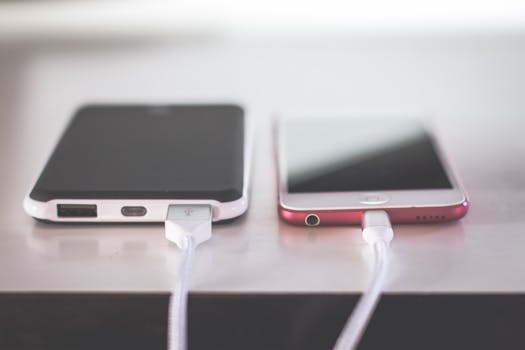
The fix is to identify two things before you buy. First, your exact iPhone model and the port on the bottom of the phone. Second, the port on the other end of the chain, meaning the computer, wall charger, car adapter or power bank you intend to plug into. The connector that goes into the phone and the connector that goes into the power source are separate decisions, and getting one right while getting the other wrong still leaves you with a cable you cannot use.
How to identify a cable in about two minutes
Identification guides published in 2026 promise that you can work out what cable you have and whether it suits your device in under two minutes. Here is the routine to follow.
- Look at both ends of the cable, not just one. Many cables have different connectors at each end.
- Check the port on the device you want to charge and note its shape and size.
- Check the port on the power source, whether that is a wall charger, laptop, car socket or power bank.
- Match each cable end to each port. Both ends have to line up correctly, or the cable will not work.
- Label the cables you keep. A strip of tape with the device name on it saves the same search next month.
If a cable physically fits but nothing happens when you plug it in, the problem is usually the cable, the power source or the port, not the connector type. Try a second cable and a second power source one at a time to isolate which part is failing.
Charging and data transfer are two different jobs
USB's role in exchanging power and data is the reason one cable can behave very differently from another that looks the same. A cable may handle charging without handling data at the speed you expect, and packaging does not always make that distinction obvious. Buying guides for smartphone charging cables have been pointing this out for years: cables come in various sizes and specifications, and the differences matter once you move past simple charging.
If your plan is to sync files, transfer photos or connect a device to a computer, check that the cable is described as suitable for data as well as charging. If a listing does not say, ask before you buy. For charging only, the priority shifts to whether the connector matches and whether the cable is built well enough to survive daily use.
What to confirm before you buy
Use this quick reference to narrow down the choice, then verify the final details against your device's documentation or the seller's product listing.
| Connector name | What to confirm before ordering |
|---|---|
| USB-C | That the device port is USB-C, and that the cable's stated capability matches what you need it for. |
| Lightning | Your exact iPhone or Apple device model, plus the port on the power source at the other end. |
| Micro-USB | That the device port is genuinely Micro-USB and not a different small connector that looks similar. |
One more check is worth doing on every order: confirm what is included. Some listings sell the cable alone, while others bundle a cable with a wall charger or car adapter. Knowing which one you are buying prevents a second order and a second wait.
Why a working cable suddenly stops working
Cables fail gradually more often than they fail all at once. The common pattern is a cable that only charges at certain angles, then only charges when held in place, then stops entirely. Daily coiling, tight bends right at the connector and being yanked out by the cord rather than the plug all shorten the useful life of a cable. If a cable has become unreliable, replace it rather than relying on it, because an intermittent connection is frustrating at home and worse when you are travelling.
Keep a spare in your bag, your car and your desk drawer if you depend on your phone through the day. Spares are cheap compared with the cost of a dead phone battery in the middle of a long day away from a socket.
Where returns and shipping matter
Connector fit is one of the few things you cannot fully judge from a product photo, which makes the returns policy a genuine part of the buying decision rather than fine print. Mobile Gadget HQ sells chargers and cables alongside phone cases for iPhone, Samsung and Google Pixel, audio gear, tablet and laptop accessories and gaming accessories. The store offers free shipping, international delivery and a 60-day return policy, which gives you room to check the fit at home and send an item back if it is not right. Check the current policy details on the site before ordering so you know the terms that apply to your location.
Frequently Asked Questions
How do I know which charging cable I need?
Look at the charging port on your device and the port on whatever you are plugging into, whether that is a wall charger, laptop or power bank. Both ends of the cable have to match. If you are unsure, check your device's documentation or the manufacturer's website, since age and brand alone are not reliable guides.
What are the three types of charging cables people ask about most?
USB-C, Lightning and Micro-USB are the three names that come up most often. USB-C appears across a wide range of modern devices, Lightning is Apple's own connector, and Micro-USB is a smaller USB variant still found on plenty of older or simpler devices. They are not interchangeable, so match the connector to your device port.
What are the different ends on charging cables?
Many cables have two different connectors, one for the device and one for the power source. The device end might be USB-C, Lightning or Micro-USB, while the power source end could be USB-A or USB-C. Confirm both ends before ordering, because a correct device connector with the wrong power end still leaves the cable unusable.
Can I use a Lightning cable with a USB-C device?
No. The connectors are physically different, and a Lightning plug will not seat correctly in a USB-C port. Forcing a connector that does not fit can damage the port. Use a cable built for your device's actual connector type, and confirm the power source end matches too.
The truth about charging cables is that the shape of the plug decides whether the cable works at all, and the specification decides how well it works once it is plugged in. Check the port, check the other end, check what the listing actually promises, and buy somewhere with a return window you can rely on. Do that, and you will stop collecting cables that do not fit.

