

Phone Case Compatibility Guide: Does One Case Fit All?
Two phones can look nearly identical on a product page and still need completely different cases. That is the trap. A shopper buys a case for an iPhone 13, upgrades to an iPhone 14, assumes the old case will work, and finds out at the kitchen table that the camera cutout lands half a centimetre off. The same thing happens with Samsung Galaxy models that share a name but not a body, and with budget Android phones that get a single case design across several variants.
The short answer is no, not every phone case fits every model. Most cases are engineered for one specific device, and the fit depends on the body dimensions, the camera layout, and the position of buttons and ports. This phone case compatibility guide walks through what actually determines fit, which models can share a case, and how to confirm your exact model before you order.
Why One Case Rarely Fits More Than One Phone
Phone makers release several models every year, and they rarely keep the outer shell identical between them. Body dimensions shift, camera modules grow, and button placement moves. Because of those differences in size across each model, even within the same generation, most iPhone cases are only compatible with one generational model.
The same principle applies across every major brand. A case that snaps onto one Galaxy S model will not necessarily snap onto another Galaxy S model from a different year, and it almost certainly will not fit a Galaxy A series phone. Compatibility guides from case makers exist precisely because guessing does not work.
The practical rule is simple. Only place your phone into a case that is designed for your specific model. A case that is "close in size" is not the same as a case that fits. Forcing a phone into the wrong shell can put pressure on the screen edges, block a microphone, or leave the camera lenses exposed to whatever is in your pocket.
What Actually Determines Whether a Case Fits
Fit comes down to three mechanical details. If any one of them is wrong, the case is wrong, even if the phone slides in.
Overall body size and shape
Length, width, thickness, and corner radius all matter. A case is moulded to hug a specific outline, so a phone that is slightly taller or slightly wider will sit crooked, bulge at the sides, or refuse to seat at all. This is the main reason guides advise checking a size chart rather than eyeballing product photos.
Camera cutouts and lens placement
Camera modules are the most common reason two similar phones cannot share a case. Lens count, lens spacing, and module position all change between models, and a cutout that does not line up will either clip the edge of a photo or leave glass exposed. Compatibility write-ups routinely single out camera cutouts as the failing point when a case almost fits.
Buttons, ports, and magnetic alignment
Volume buttons, the power button, the charging port, and speaker openings are positioned differently from model to model. Button cutout alignment matters as much as the outer shell. On phones that support magnetic accessories, the magnet ring also has to sit in the right place, otherwise the case blocks the alignment it was supposed to help with. Case makers publish fit notes for exactly these details, including magnetic support where it applies.
iPhone Case Compatibility: Which Models Share a Case
iPhone is the brand most people assume is interchangeable, and it is also the brand where the assumption causes the most returns. Apple's lineup changes shape often enough that case compatibility is largely model-by-model. Compatibility charts confirm that iPhones released after the iPhone 12 are not cross-compatible with other models.
A few pairings do work. iPhone 8 and iPhone SE cases are commonly listed as interchangeable because the two share a body design. Between recent generations, most iPhone 13 cases fit the iPhone 14, with the exception of certain cases that have very tight camera cutouts. Pro models are a separate story, because the Pro and Pro Max camera and sensor arrangements differ from the standard models and from each other.
| iPhone pairing | Does it typically work? | What to watch |
|---|---|---|
| iPhone 8 and iPhone SE | Yes, commonly listed together | Confirm the exact SE generation in the product listing |
| iPhone 13 and iPhone 14 | Usually, for most cases | Tight camera cutouts may not line up |
| iPhone 13 Pro and iPhone 14 Pro | No, do not assume it | Camera and sensor arrangements differ |
| iPhone 12 and later, across other models | No | Cases are model specific after the iPhone 12 |
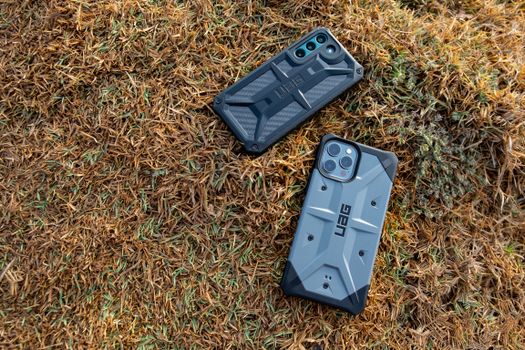
Samsung Galaxy Case Compatibility: S Series and A Series
Samsung is harder to generalise than iPhone because the Galaxy range splits into several families. Galaxy S models, Galaxy A models, and the various Plus, Ultra, and FE variants each have their own dimensions. Samsung compatibility charts are organised around those families for a reason, and shoppers are expected to match the exact model name rather than the brand or the series alone.
Published compatibility charts for Galaxy devices cover the S series and the A series separately, which tells you that a case built for one family is not intended to cross over. If you own a Galaxy phone, read the model number from your device settings and match it character for character against the case listing. A Galaxy S model and a Galaxy A model with a similar screen size will still need different cases.
Google Pixel and Other Android Brands
Pixel phones follow the same pattern. Google changes the camera bar and the body proportions between generations, so cases are sold against specific Pixel model names. The same is true for other Android brands carried by accessory shops, including LG and Motorola, where the model name and generation decide fit.
Compatibility write-ups designed to cover multiple brands handle this by grouping devices into model-specific sections with their own fit notes. That structure exists because there is no universal Android case size. If your phone is not listed in a compatibility chart, treat the case as unverified and check the manufacturer's own specification before ordering.
How to Find Your Exact Phone Model in Seconds
Most compatibility problems start with not knowing the exact model name. Here is how to pin it down.
- Open your phone's settings and look for the About Phone or General section.
- Read the full model name, including any Pro, Plus, Ultra, Max, or FE label. Write it down exactly.
- If the settings menu is unclear, check the original box or the model number printed on the device.
- Match that exact name against the compatibility list on the case product page, not against the photo.
- If the listing uses a range of models, confirm your specific model appears in that range before you pay.
It takes less than a minute, and it is the single step that prevents most wrong-case orders.

Cross-Generation Fit: When Two Models Really Do Share a Case
Cross-generation fit is the exception, not the rule. A handful of pairings are well documented, such as the iPhone 8 and iPhone SE sharing a body, and most iPhone 13 cases working on the iPhone 14. Outside those known cases, assume nothing.
Where a case maker explicitly states that a case covers a range of models, that statement is the authority. Where a chart shows a single model, that is the only model the case is built for. Any advice beyond those two situations is guesswork, and guesswork on a phone case usually means a return.
Signs a Case Will Not Fit Before You Force It
If you already have the case in hand, stop before you push harder. These are clear warning signs that the case is for a different model.
- The camera cutout does not sit evenly around the lenses.
- The volume or power buttons do not line up with the moulded buttons on the case.
- The phone sits proud of the case edge on one side but flush on the other.
- The charging port opening lines up off-centre.
- The case flexes or bulges when the phone is seated, rather than holding it snugly.
None of these problems improve with time. They either block a function or leave part of the phone unprotected.

What to Check on a Product Page Before You Buy
Before adding a case to your cart, work through a short checklist. Confirm the exact model name in the compatibility list. Confirm the case style matches your phone's camera module shape. Check whether the listing mentions button cutout alignment and magnetic support if your phone uses magnetic accessories. Check whether the seller states a return window in case the fit is wrong.
If a listing does not name your model clearly, ask before ordering. A quick question is faster than a return.
Shipping, Returns, and Getting the Right Case First Time
Mobile Gadget HQ stocks cases for iPhone, Samsung, and Google Pixel alongside LG and Motorola accessories, with free shipping, international delivery, and a 60-day return policy. That return window matters more for cases than for most accessories, because fit problems only show up once the case is in your hands.
Even so, the cheapest and fastest route is to order the right case the first time. Read your model name from your phone settings, match it against the listing, and treat any cross-generation claim as something the seller has to state outright. Do that, and the case you open will be the case that fits.
Frequently Asked Questions
Does every phone case fit every model?
No. Most cases are built for one specific model, and fit depends on the body size, camera cutout, buttons, and port positions. Even phones that look similar on a product page can need different cases. Compatibility charts exist because of this, and iPhones released after the iPhone 12 are not cross-compatible with other models.
Do iPhone 12 and iPhone 13 cases fit each other?
Do not assume they do. Compatibility guidance states that iPhones after the iPhone 12 are not cross-compatible with other models, so iPhone 12 and iPhone 13 cases should be treated as model specific. A better-documented crossover is between the iPhone 13 and iPhone 14, where most cases fit except those with tight camera cutouts.
How do I know which phone case to buy?
Find your exact model name in your phone's settings under About Phone, then match that name character for character against the compatibility list on the case product page. Check the camera cutout shape, button alignment, and whether the listing mentions magnetic support. If your model is not named, treat the case as unverified and confirm before ordering.
Can one case fit a Samsung Galaxy S phone and a Galaxy A phone?
Samsung compatibility charts separate the Galaxy S series and the Galaxy A series, so a case built for one family is not intended to transfer to the other. Screen sizes can be close while the body dimensions and camera layout differ. Match the exact Galaxy model name, including any Plus, Ultra, or FE label, before purchasing.
What should I do if a case arrives and does not fit?
Stop trying to force the phone into it, because pressure on the screen edges and blocked ports cause real damage. Check the model name on the packaging against your device to confirm the mismatch, then use the seller's return process. Mobile Gadget HQ offers a 60-day return policy, which gives you time to sort out a wrong-model order.

